Unified Modeling Language#
The Unified Modeling Language (UML) is a widely adopted stsandard for visualizing, specifying, constructing, and documenting the artifacts of software systems. UML provides a set of graphic notation techniques to create abstract models of systems, which can be used for both software and information management contexts.
UML assists in bridging the gap between conceptual design and implementation by offering a common lagnuage for stakeholders, analysts, designers, and devleopers. Through its visual diagrams, it enables clear communication of system structure and behavior, making it easier to analyze requirements and design robust solutions.
UML’s flexibility allows it to be applied across a range of domains, from database design to process modelling and enterprise architecture. In information management, UML helps to clarify data flows, relationships, and system interactions, supporting both technical and non-technical stakeholders in understanding system dynamics.
Standard UML Models#
UML comprises several types of diagrams, each serving a distinct purpose in modelling information systems. These diagrams can be broadly grouped into structural diagrams (which show the static aspects of a system) and behavioral diagrams (which show the dynamic aspects).
In information management system, diagrams are used to model, analyze, and communicate how data and processes behave in an information system. Unified Modeling Langauge provides several diagram types, each focusing on different aspects of the system. Together, they help ensure that database and system designs are consistent, reliable, and aligned with user requirements.
Describes the static structure of a system, including classes, attributes, operations, and relationships.
Models the static structure of a system: its classes, attributes, operations, and relationships. It is particularly important for information maangement because it closely relates to database schema design.
Represent key entities (e.g. Book, Member, Loan).
Data stored in such class (e.g. title, author, dueDate).
Functions or methods (e.g. calculateFine(), updateStatus()).
Associations, aggregations, compositions, and inheritance between classes.
Example
Modelling the entities and relationships in a university database, such as Student, Course, and Enrolment.
Example
Library Domain Classes:
Book:
bookId,title,author,statusMember:
memberId,name,emailLoan:
loanId,loanDate,dueDateRelationships:
Member“has many”LoansBook“is loaned in”Loans
Illustrates the functionality provided by a system in terms of actors and their interactions with use-cases.
It shows the functional requirements of a system from the perspective of its users (called actors). It answers the question: “What should the system do?”
External entities that interact with the system (e.g. Customer, Admin).
Goals or tasks the actors perform using the system (e.g. Place oder, Update inventory).
Includes, extends, and associations between actors and use-cases.
Example
Showing how a library member interacts with a library sytem to borrow books or pay fines.
Example
Online Library System:
Actors:
Student,LibrarianUse-cases: Search books, Borrow book, Return book, Manage catalog
Student→ Search books, Borrow book, Return bookLibrarian→ Manage catalog, Approve membership
Shows how objects interact in a particular scenario of a use-case, focusing on the sequence of messages exchanged.
Models the time-ordered interaction between objects or components. It is useful for analyzing how data flows through the system during a specific scenario.
Shows objects (e.g. user, web application, database).
Displays messages exchanged over time (e.g. requests, responses).
Helps identify potential performance and reliability issues in process flows.
Example
Modelling the steps involved when a customer places an online order, including interactions between customer, shopping cart, and payment gateway.
Example
Borrow Book Scenario:
Student → Library system:
requestBook(bookId)Library system → Database:
checkAvailability(bookId)Database → Library system:
availabilityStatusLibrary system → Student:
confirmBorrow/rejectBorrow
Represents workflows of stepwise activities and actions, supporting modelling of business and operational processes.
Represents the workflow or business process in terms of activities, decisions, and parallel flows. It is useful for modeling how information is processed and transformed.
Shows activities (tasks), decision points, and start/end nodes.
Can represent parallel processes (e.g. two checks happening at the same time).
Supports analysis of efficiency and bottlenecks in processes.
Example
Diagramming the process of onboarding a new employee, from document submission to training allocation.
Example
User Registration Process:
Start → Fill registration form → Validate data
Decision: “Data valid?”
If yes → Create user record → Send confirmation email → End
If no → Show error message → Return to Fill registration form
Depicts the states of an object and transitions triggered by events.
Models the states of an object and the events that cause transitions between those states. It is valuable for understanding how data entities change over time.
Focuses on a single entity (e.g.
Order,Membership,Ticket).Shows states (e.g.
Pending,Approved,Cancelled).Shows events or triggers that cause state changes (e.g.
payment,received,request cancelled).
Example
Modelling the lifecycle of a loan application, from submission to approval, rejection, or withdrawal.
Example
Library Membership State:
States:
Applied→Active→Suspended→TerminatedTransitions:
Applied→Active(after approval)Active→Suspended(after overdue fines)Suspended→Active(after fines paid)Active/Suspended→Terminated(on request or policy)
Models the physical aspects of a system, such as software components, their organization, and dependencies.
Shows the high-level structure of the system in terms of software components and their dependencies. It is useful for analyzing scalability, reliability, and maintainability.
Logical modules (e.g. User interface, Business logic, Database service).
Services provided or required by components.
How components interact and rely on each other.
Example
Illustrating the major modules of a hospital management system, such as patient records, billing, and scheduling.
Example
Information Management System Components:
Web client component (browser-based interface)
Application server component (handles business rules and queries)
Database component (stores and manages data)
Reporting component (generates analytical reports)
Dependencies: Web client → Application server → Database; Application Server → Reporting component
Integrating Diagrams#
These diagrams complement each other in designing robust information systems:
Use-Case Diagrams capture functional requirements.
Class Diagrams defien the data structure and support database schema design.
Sequence and Activity Diagrams detail how information is processed.
State Machine Diagrams track changes in data entities over time.
Component Diagrams show the structural organization of the system.
Using these models together supports the design of database systems that are efficient, secure, and aligned with user needs, and provides a clear basis for implementing queries and operations on the underlying data.
UML Patterns#
Patterns in UML are reusable solutions to commonly occurring problems in software design and information management. They help standardize approachees, improve system quality, and facilitate communication among stakeholders. By applying UML patterns, designers can leverage proven strategies to address issues such as object creation, system organization, and interaction management.
UML patterns can be categorized into structural patterns (which deal with object composition), behavioral patterns (which focus on object communication), and creational patterns (which manage object creation).
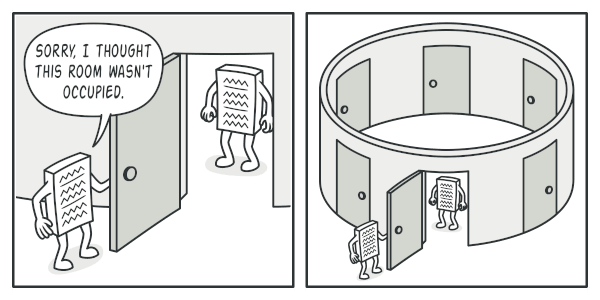
Ensures a class has only one instance and provides a global point of access.
Typical Application
Configuration managers, logging systems.
Example
A system-wide settings manager for a government portal, ensuring all modules access the same configuration.
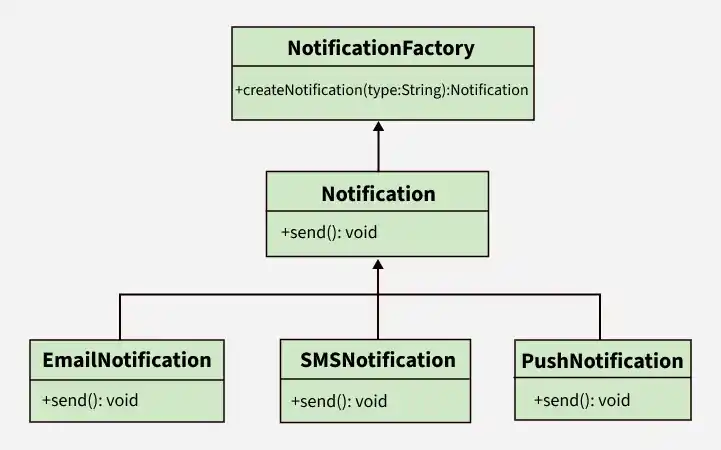
Creates objects without specifying the exact class of object to be created.
Typical Application
Object creation frameworks, database connections.
Example
A document management system that generates different types of documents (PDF, Word, Excel) based on user selection.
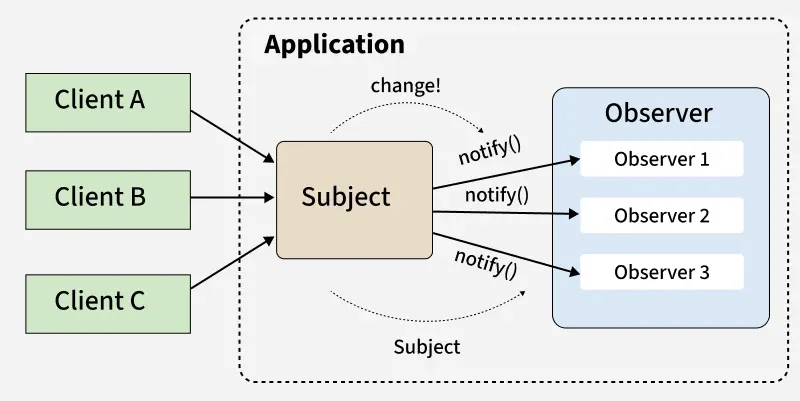
Defines a one-to-many dependency so that when one object changes state, all its dependents are notified.
Typical Application
Event handling systems, notification services.
Example
In an e-commerce platform, customers are notified when a product they are watching is back in stock.
Enables selecting an algorithm’s behavior at runtime.
Typical Application
Sorting routines, payment processing systems.
Example
A payroll system that selects different tax calculation strategies based on employee type.

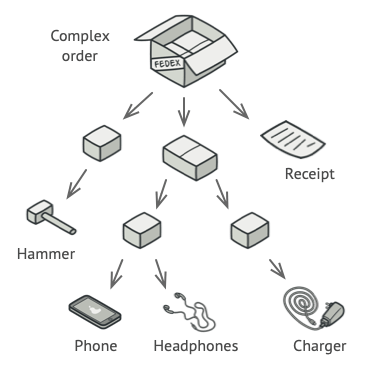
Composes objects into tree structures to represent part-whole hierarchies.
Typical Application
File systems, organizational charts.
Example
Modelling a university’s organizational structure, where faculties contain departments, which contain staff members.
Applying UML Patterns#
In information management, UML patterns can be leveraged to model data structures, workflows, and business rules. For example, the Composite Pattern is useful for representing hierarchical relationships in organizational data, while the Observer Pattern can facilitate event-driven updates in distributed information systems.
Example
Consider a hospital information management system:
The Composite Pattern could be used to model the organizational hierarchy, where a hospital contains multiple departments, each department contains wards, and each ward contains beds and patients.
The Observer Pattern could be used for alerting staff when a patient’s vital signs reach critical levels, ensuring timely responses.
The Strategy Pattern might be useful for implementing different billing strategies depending on patient insurance types.